This guide describes the phenomenon of OCR and other text variants that commonly impact genealogical searches of digital databases. The focus and examples are the Chronicling America newspaper collection. This guide also provides details on how to use the VariantChronicles tool to successfully search across OCR and other surname variants within the Chronicling America collection.
Chronicling America and OCR Surname Variants
What Is an OCR Variant?
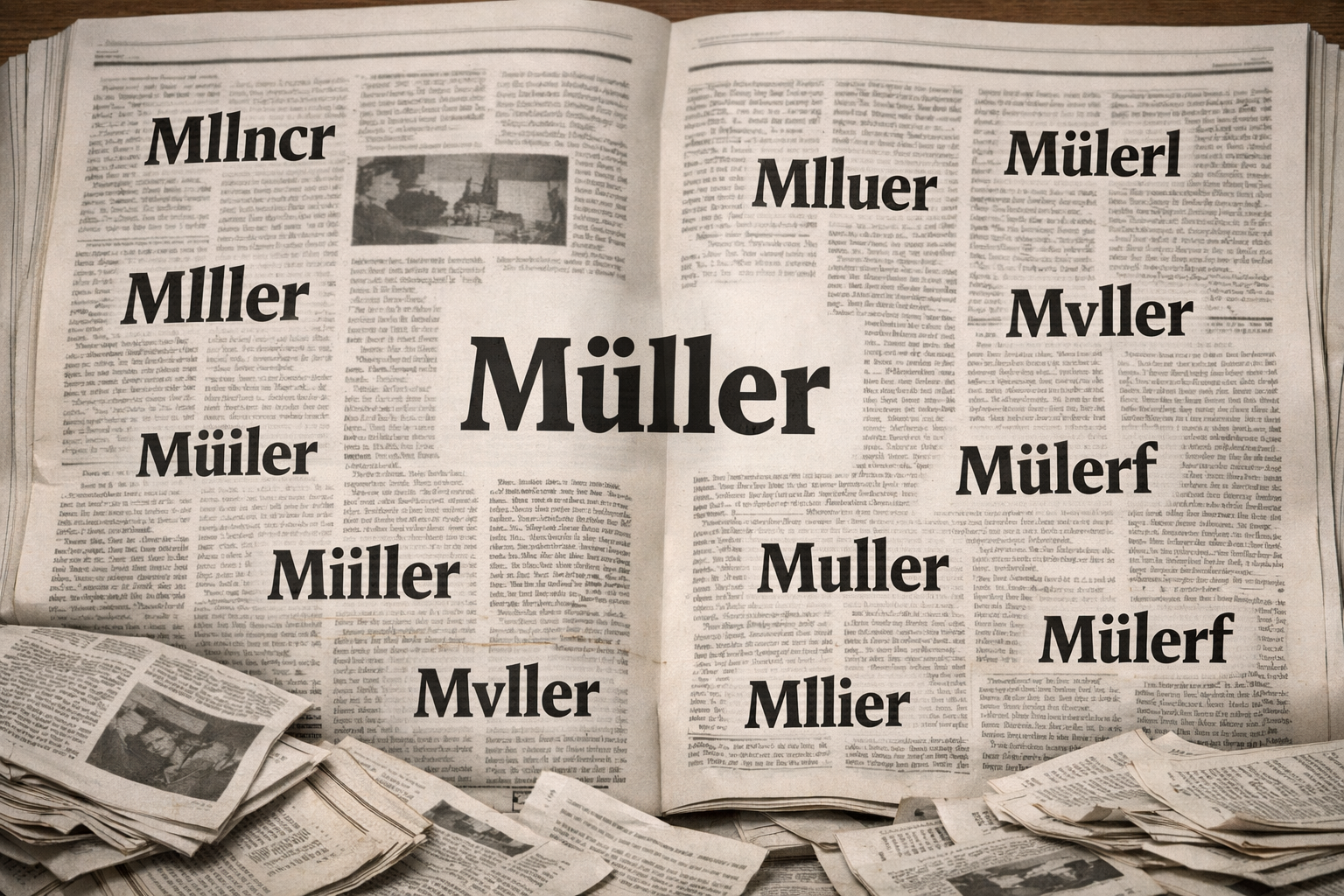
When the Library of Congress digitized millions of historical American newspaper pages for the Chronicling America collection, it used optical character recognition (OCR) software to convert scanned images into searchable text. OCR works by analyzing the visual shape of printed characters and matching them to known letter forms. On aged, faded, or damaged newspaper pages this process is imperfect — and the errors it produces follow predictable patterns.
An OCR variant is an alternate spelling of a surname that resulted from one of these scanning errors. When you search for your ancestor’s surname, this tool automatically searches for the variants alongside the original spelling, giving you a far better chance of finding records that exist in the collection but would otherwise be invisible to a standard search.
Why Do These Errors Happen?
Several factors contribute to OCR errors in the Chronicling America collection:
- Paper and print quality. Nineteenth century newsprint was acidic and degrades over time. Faded ink, foxing, and physical damage to the original paper all reduce OCR accuracy. Some collections show accuracy rates below 85% for pre-1900 content.
- Microfilm intermediaries. Most Chronicling America pages were scanned from microfilm rather than original newspapers. Microfilm introduces bleedthrough from the reverse page, uneven lighting, and contrast issues that confuse OCR software.
- Historical typefaces. Early newspapers used the long-s (ſ), a letterform that looks almost identical to f and is almost universally misread as f by OCR. German-language American newspapers used Fraktur blackletter typeface through the 1940s — a script with its own alphabet of confusable characters that Latin-trained OCR handles poorly.
- Narrow column layouts. Newspaper text set in narrow columns causes words to break across lines in ways that confuse OCR segmentation. A surname split across a line break may not be recognized as a single word.
Variant Types and Examples
Character substitution variants arise when visually similar letterforms are confused. The most common pairs in historical newspaper OCR are:
- rn misread as m — Arnold becomes Amold
- m misread as rn — Smith becomes Srnith
- u misread as n — Mueller becomes Mneller
- h misread as li — Whitfield becomes Wliitfield
- ri misread as n — Harris becomes Hams
- c misread as e — Clark becomes Elark
- v misread as w — Vaughan becomes Waughan
Long-s variants include examples such as Mason appearing as Mafon, and Ross appearing as Rofs.
Fraktur variants affect German surnames appearing in German-language American newspapers, which used Fraktur blackletter typeface as standard. Fraktur has its own set of confusable characters distinct from standard Latin type. The letters u, n, and m are particularly prone to confusion with each other in Fraktur, and the letter w is sometimes read as sch due to its multiple vertical strokes. A surname like Wagner might appear as Magner or Wagnec in Fraktur OCR output.
Diacritic variants affect surnames from languages that use accented characters. When OCR encounters an umlaut, accent, or other diacritic mark it may strip it entirely, substitute a different character, or render it as a two-letter sequence. Common patterns include:
- German ä rendered as ae or a — Müller becomes Mueller or Muller
- German ö rendered as oe or o — Schröder becomes Schroeder or Schroder
- Spanish ñ rendered as n — Núñez becomes Nunez
- Scandinavian ø rendered as o or oe — Bjørnsen becomes Bjornsen
- Polish ł rendered as l — Małecki becomes Malecki
Anglicization variants reflect the real-world practice of immigrant surnames being adapted to English spelling conventions, sometimes by the family itself and sometimes by newspaper typesetters. These are not OCR errors but function identically for search purposes. Common patterns include:
- German Müller anglicized to Miller
- German Schmidt anglicized to Smith
- German Schneider anglicized to Snyder or Snider
- German Koch anglicized to Cook
- German Braun anglicized to Brown
- German Klein anglicized to Cline or Kline
Period spelling variants reflect the genuine orthographic variation that existed before surnames became standardized. Before the mid-nineteenth century the same surname was often spelled multiple ways even within a single document. Common patterns include:
- Smith appearing as Smyth, Smithe, or Smythe
- Brown appearing as Browne
- Clark appearing as Clarke
- Gray appearing as Grey
Suffix and prefix variants reflect variation in how surname affixes were rendered across different papers, timeframes, and transcription practices:
- Irish Mc- and Mac- prefixes used interchangeably — McCarthy appears as both McCarthy and MacCarthy
- Scandinavian -son and -sen endings interchangeable — Larson and Larsen refer to the same family
- Polish -ski, -sky, and -ske endings all in use — Kowalski, Kowalsky, Kowalske
Ink spread and physical degradation variants arise when ink bleeds into adjacent white space, closing open letters or merging adjacent characters. Common patterns include c becoming o, o becoming c, and e becoming c when ink fills the open counter of the letter.
When Variants Will Not Help
It is important to understand that some search failures cannot be addressed by variant generation. If a surname was split across a column break and OCR segmented it as two separate words, neither word will match a surname search regardless of how many variants are tried. If a page was so physically damaged that OCR produced only garbled output, the page may simply be unsearchable by text. In these cases the Chronicling America page images are still available and can be browsed directly — the absence of a text search result does not mean the page does not exist.
Using VariantChronicles as a Research Method
The sections below translate the variant concepts in this guide into a practical workflow for searching the Chronicling America collection with VariantChronicles.
Chronicling America: The Source Collection
Chronicling America is a digital newspaper archive maintained by the Library of Congress. VariantChronicles enhances searching this collection — especially for genealogists — by helping you find surnames that may be missed because of OCR errors, historical spelling, or language and typeface differences.
Surname and First Name
A surname is required. The field is intended for a surname, though you can enter any word. In the current version, the surname field is the one that gets expanded into many spelling and OCR-based variants. The first-name field is optional. Right now, the variant feature is not applied to first names. Instead, your first name is searched alongside each surname variant.
For scenarios where a first name is included: to keep results relevant, matches are returned only when the first name appears within 5 words of the surname (and this rule is applied across all surname variants). This helps capture common name formats such as “John Mueller,” “John H. Mueller,” and “Mueller, John.” More flexibility in how the first name is used is being considered for a future iteration of the tool.
OCR Variants Feature: Purpose and Default Behavior
OCR (optical character recognition) is the software that converts newspaper images into searchable text. On older or damaged pages, OCR can introduce predictable mistakes: similar-looking letters get confused, ink bleed closes open letter shapes, and historical typefaces (including German Fraktur) produce distinctive errors. As a result, a surname may appear in the archive in spellings you would not think to search.
The Variants feature automatically searches these alternate spellings alongside your original term, which can surface records the standard Chronicling America search may miss. Results are organized by the variant that produced them, so you can quickly focus on the spellings most relevant to your family or time period.
When Variant Searching Is Most Useful
Variant searching is generally useful, though usefulness varies by time period, surname, and research goal. Testing has produced strong results across many scenarios. You can limit your search by newspaper language. Variant searching can be especially helpful in non-English newspapers, where OCR is known to struggle with certain type styles — particularly German-language papers printed in Fraktur.
Variant Categories Included in VariantChronicles
VariantChronicles covers several categories of variation:
- OCR character substitutions (for example, the sequence rn being read as m)
- Long-s (ſ) variants in early newspapers, where the historical long-s character is often misread as f
- Fraktur variants that affect German surnames in German-language American newspapers, which commonly used this typeface into the 1940s
- Diacritic variants for accented characters (like umlauts) that OCR often mishandles
- Anglicization and historical spelling (for example, Müller → Miller; Smith → Smyth)
- Prefix/suffix variation that is genealogically relevant even when it is not strictly OCR-related (for example, Mc- and Mac- used interchangeably)
Because results are grouped by each variant surname, you can focus on the spellings that matter most for your research.
How Results Are Organized
Results are grouped by the specific variant that produced them. Each variant gets its own expandable section showing matches found under that spelling. This grouping is intentional for genealogy: knowing which OCR error produced a hit (for example, seeing “Srnith” suggests the OCR confused m with rn) can be useful context for your research notes and helps you understand what you are seeing on the original page.
How Surname Variants Are Generated
The tool uses a mix of (1) a pre-built surname dictionary (including common variant sets across languages represented in the newspaper collection) and (2) a rule-based engine that generates likely OCR and spelling variants for most surnames. In a small number of edge cases, an AI-assisted method is used as a final fallback. In testing, the observed edge cases corresponded to two-letter surnames.
Result Limits and “Load More” Behavior
Initially, up to 20 results are shown per variant. If more results are available, a “Load More” button appears at the bottom of that variant’s section. Each click loads the next set of results for that variant only. When all available results for a variant are displayed, the button disappears. The count shown on each variant tab tells you how many results are currently displayed and whether more may be available.
Interpreting Uneven Variant Result Counts
Each variant is a separate search term against the Chronicling America collection. Some OCR error patterns are more common than others, some apply more often to particular typefaces or decades, and some variants simply produce fewer matches because that misspelling occurred less often. If you see few (or no) variants for a surname, it may be because the tool did not identify meaningful OCR patterns for that name, or because the likely variants would be so broad that they would overwhelm your results with false matches.
Search Duration and Progressive Loading
Search time depends on how common your surname is, how many variants are generated, and current traffic on the Chronicling America API. For common surnames with many variants, a full search may take 15–60 seconds or longer. Results appear progressively as each wave of variant searches completes, so you’ll see sections populate in real time rather than waiting for everything to finish at once. Patience is appreciated as this tool is designed to be respectful of load on the Library of Congress’s public servers.
Handling Timeout Errors
Timeout errors occur when the Chronicling America API takes longer than expected to respond, often during periods of high traffic on Library of Congress servers. A simple fix found during testing is to wait a moment, then click Search again without changing your parameters. The second attempt often completes quickly because the underlying queries may already be in progress on their end. You should not lose results by retrying.
If some variant sections loaded successfully but others show a timeout error, you do not need to start over. Click Search again without changing any search parameters. The tool will re-run searches that failed while skipping (or quickly refreshing) the variants that already succeeded. In practice, a second attempt almost always completes fully and without missing results.
Evaluating OCR Snippet Text in Results
The snippet text comes from OCR (the machine-read version of the page), so it may look messy even when the printed newspaper is clear. For genealogy, always click through and review the original page image before drawing conclusions or adding a citation to your notes.
Clicking Through to a Result
All results link back to the records on the Chronicling America website so you can examine the source directly. When you click on a result, you’ll be taken directly to the newspaper page on the Chronicling America site. That page includes the page image plus metadata that can help you evaluate context and create a proper citation.
Relationship to the Library of Congress
VariantChronicles is an independent research product with no association with the Library of Congress. It queries the publicly available Chronicling America API, but it is not affiliated with or endorsed by the Library of Congress.
Data Handling
The tool does not store the newspaper content it retrieves. It queries the Chronicling America API in real time and displays results that link to the original source. Newspaper content is not copied, stored, or republished. When you click through to view a page image, you are accessing it directly from Library of Congress servers.
About the Author
Nathan is an avocational genealogist and the founder of Evidence Toolbox. His research practice is grounded in the Genealogical Proof Standard, with primary-source work conducted at major repositories including the Library of Congress. He builds the tools on this site to solve problems encountered in his own research, and field-tests each one against real family lines before release. You can reach him at contact@evidencetoolbox.com.